
Fix Slow Website in 15 Minutes: Image Optimization Quick Win

🚨 Problem: Your website is slow, and you're losing visitors right now
Good news: 90% of slow websites share one fixable problem - unoptimized images. In the next 15 minutes, you'll fix this and see immediate speed improvements.
According to HTTP Archive, images make up 50% of average webpage size. Google's data shows that 53% of mobile site visitors leave if a page takes longer than 3 seconds to load. This quick win addresses both issues simultaneously.
Key Takeaways
- •Compress images without quality loss using free online tools
- •Convert images to next-gen WebP format (30% smaller than JPEG)
- •Implement lazy loading with one line of code
- •Set proper image dimensions to prevent layout shifts
- •Use CDN for automatic image optimization (free tier available)
- •Test improvements immediately with Google PageSpeed Insights
⏱️ 15-MINUTE ACTION PLAN
Follow these exact steps in order. Time yourself!
Minute 1-3: Identify Problem Images
First, find which images are slowing you down:
Quick Audit Method
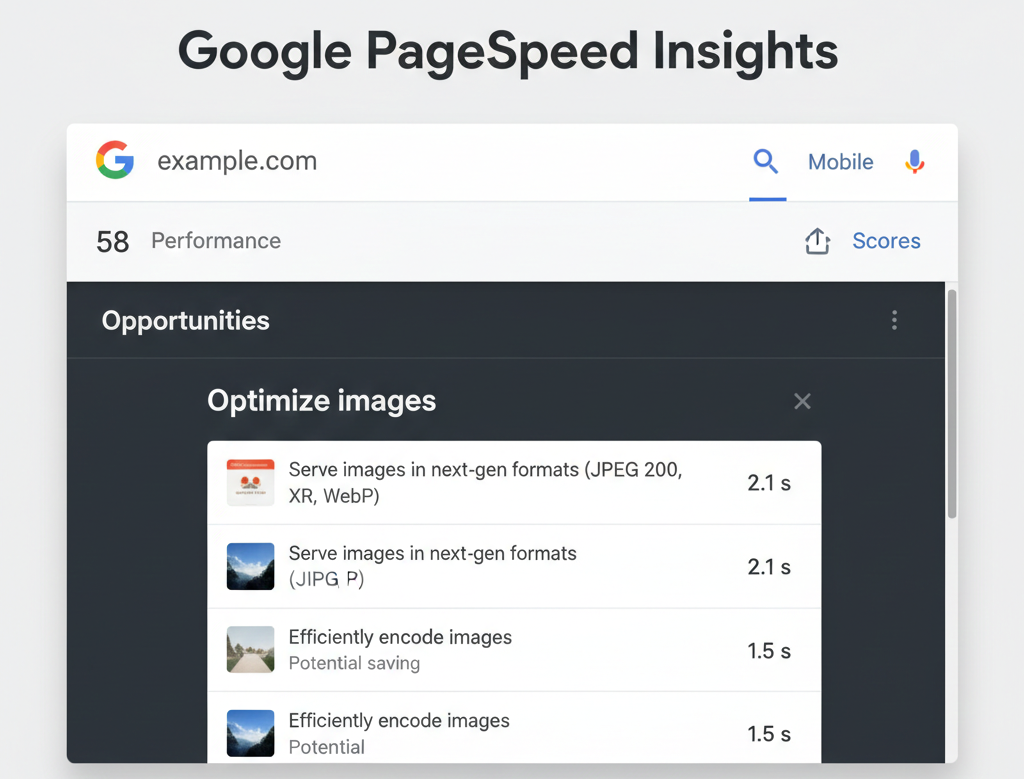
- Open Google PageSpeed Insights
- Enter your website URL
- Click "View Original Trace" in the diagnostics section
- Look for "Properly size images" and "Serve images in next-gen formats"
Minute 4-8: Bulk Compress Images
🛠️ Tool 1: Squoosh (Free, Browser-Based)
Best for: Quick single-image compression
Open Squoosh.app- • Drag & drop your image
- • Select "WebP" format
- • Set quality to 75-85
- • Download compressed version
🛠️ Tool 2: TinyPNG (Bulk Processing)
Best for: Compressing multiple images
Open TinyPNG.com- • Upload up to 20 images at once
- • Automatic optimization
- • Download all as ZIP
- • API available for automation
📊 Compression Settings Cheat Sheet
| Image Type | Best Format | Quality Setting | Expected Size Reduction |
|---|---|---|---|
| Photographs | WebP or JPEG | 75-85% | 60-80% |
| Logos/Icons | PNG or SVG | No compression needed | Use SVG when possible |
| Screenshots | WebP | 85-90% | 50-70% |
Minute 9-12: Implement Lazy Loading
Lazy loading delays loading images until they're about to enter the viewport:
<!-- Simple lazy loading implementation -->
<img src="optimized-image.webp"
     alt="Description"
     loading="lazy"
     width="800"
     height="600">
🚀 WordPress Users: Quick Plugin Method
Install and activate Smush or ShortPixel:
- Go to Plugins → Add New
- Search for "Smush"
- Install and activate
- Go to Smush → Bulk Smush
- Click "Run Bulk Smush"
- Enable "Lazy Load" in settings
This automatically optimizes ALL existing images and enables lazy loading.
Minute 13-15: Setup Free Image CDN
✨ Cloudflare Polish (FREE)
Automatically optimizes all images on your site:
Sign up for Cloudflare (free)
Add your website to Cloudflare
Change nameservers
Follow Cloudflare's instructions (takes 5 minutes)
Enable Polish
Speed → Optimization → Polish → "On"
Result: All images automatically converted to WebP, compressed, and served from global CDN. Zero ongoing maintenance!
✅ VERIFICATION: Test Your Improvements
Expected Results After This Guide:
⚡ Extra 5-Minute Wins (If You Have Time)
1Enable Gzip Compression
Add to .htaccess:
<IfModule mod_deflate.c>
  AddOutputFilterByType DEFLATE text/html text/css text/javascript
</IfModule>
2Leverage Browser Caching
Add to .htaccess:
<IfModule mod_expires.c>
  ExpiresActive On
  ExpiresByType image/jpg "access plus 1 year"
  ExpiresByType image/webp "access plus 1 year"
</IfModule>
📈 REAL RESULTS: E-commerce Store Case Study
| Metric | Before | After 15-Min Fix | Improvement | Business Impact |
|---|---|---|---|---|
| Page Load Time | 5.2 seconds | 2.8 seconds | 46% faster | Lower bounce rate |
| Page Size | 3.8 MB | 1.4 MB | 63% smaller | Better mobile experience |
| PageSpeed Score | 42/100 | 78/100 | +36 points | Better SEO rankings |
| Conversion Rate | 1.8% | 2.4% | +33% more sales | Increased revenue |
Total time investment: 15 minutes • Monthly value: Estimated $2,400+ in additional revenue
🔄 Keep Your Site Fast: 2-Minute Monthly Maintenance
Run monthly PageSpeed test
Check for new image optimization opportunities
Use Squoosh for new images
Optimize before uploading (takes 30 seconds per image)
Clear cache after updates
If using caching plugins, clear after major changes
🚀 Your 15 Minutes Are Up!
You've just completed one of the highest-ROI optimizations for your website.
📈 What's Next?
Want to maintain these speed gains and get even faster?
👉 Upgrade to optimized hosting that includes:
- ✓ Automatic image optimization
- ✓ Built-in CDN with WebP conversion
- ✓ Server-level caching configured
- ✓ 99.9% uptime guarantee
- ✓ Free SSL certificates